
Configuration
mmk needs two things to run: a connection string and a database name. Everything else has a default. You can set things in four places. When the same setting appears in more than one, the higher one wins:
- Command-line flags, like
--uriand--db - Environment variables, like
MMK_URIandMMK_DB(a.envfile is read automatically) - A config file,
mmk.config.js/.ts/.json - Built-in defaults
A config file is optional. In CI it's common to have none at all and set two environment variables.
The config file
mmk init writes a config file with every option and a comment explaining each one. mmk looks for these in the folder you run it from, and uses the first it finds:
mmk.config.tsmmk.config.jsmmk.config.json
To use a file somewhere else, pass --config path/to/file.
export default {
  uri: process.env.MONGO_URL ?? 'mongodb://localhost:27017',
  dbName: 'shop',
  migrationsDir: './migrations',
};import type { MmkConfig } from 'mongo-migrate-kit';
const config: Partial<MmkConfig> = {
uri: process.env.MONGO_URL ?? 'mongodb://localhost:27017',
dbName: 'shop',
migrationsDir: './migrations',
createExtension: 'ts',
};
export default config;{
"uri": "mongodb://localhost:27017",
"dbName": "shop",
"migrationsDir": "./migrations"
}These examples use export default. In a CommonJS project (no "type": "module" in package.json) write module.exports = instead. mmk init picks the right one for you. A .ts config needs Node 22.18 or newer, or tsx (see TypeScript).
A JSON config can't hold functions, so hooks, logger and mongoose only work in a .js or .ts file.
Loading the connection string from a secret manager
A .js or .ts config can export a function instead of an object. It can be async, so you can fetch the connection string from AWS Secrets Manager, Google Secret Manager, Vault or anything else when mmk starts:
// mmk.config.js
import { SecretsManagerClient, GetSecretValueCommand } from '@aws-sdk/client-secrets-manager';

export default async () => {
  const sm = new SecretsManagerClient({ region: 'eu-west-1' });
  const res = await sm.send(new GetSecretValueCommand({ SecretId: 'prod/mongo' }));
  const { uri, dbName } = JSON.parse(res.SecretString ?? '{}');
  return { uri, dbName, migrationsDir: './migrations' };
};
mmk doesn't ship any cloud SDKs. You install the one you use. The secret is never written to disk, and a rotated secret is picked up on the next run. mmk init --secret-provider writes a starting point for you. If the function throws, mmk stops with CONFIG_INVALID and shows the original error.
Values returned this way sit at the config-file level, so environment variables and flags still override them.
All settings
| Setting | Default | What it does |
|---|---|---|
uri | none, required | MongoDB connection string. Must start with mongodb:// or mongodb+srv://. |
dbName | none, required | The database to migrate. |
migrationsDir | './migrations' | Folder with your migration files, relative to where you run mmk. |
migrationsCollection | '_mmk_migrations' | Collection that holds the history. |
lockCollection | '_mmk_locks' | Collection that holds the lock. |
lockTTLSeconds | 60 | How long before an abandoned lock counts as stale. |
strict | false | Stop instead of warn when you name an applied file whose checksum changed. |
useTransaction | false | Run every migration in a transaction. A file's own useTransaction overrides this. |
fileExtensions | ['.ts', '.js'] | Which files in migrationsDir count as migrations. |
createExtension | 'js' | File type mmk create writes: 'js' or 'ts'. |
sequential | false | Name new files 0001-, 0002- instead of using a timestamp. |
templatePath | none | Your own template for mmk create. |
author | your git name, then OS user | What mmk create writes into the author line. |
requireAuthor | false | Refuse mmk up if a file to run has no author. |
namespace | none | Only for several repos on one database. Lowercase letters, digits, . _ -, up to 64 characters. Set once and never change it. |
mongoClientOptions | none | Extra options for the MongoDB client: TLS, timeouts, auth, read preference. |
hooks | none | Functions that run around migrations. See Hooks. |
mongoose | none | Your Mongoose instance, if migrations use it. It shows up as ctx.mongoose. |
logger | built-in | Your own logger, or null to print nothing (handy in tests). |
service | nearest package.json name | Deprecated. Use namespace. Will be removed in 2.0. |
Environment variables
Every simple setting has a variable. They override the config file.
| Variable | Setting |
|---|---|
MMK_URI | uri |
MMK_DB | dbName |
MMK_MIGRATIONS_DIR | migrationsDir |
MMK_COLLECTION | migrationsCollection |
MMK_LOCK_COLLECTION | lockCollection |
MMK_LOCK_TTL | lockTTLSeconds |
MMK_STRICT | strict |
MMK_USE_TRANSACTION | useTransaction |
MMK_SEQUENTIAL | sequential |
MMK_CREATE_EXTENSION | createExtension |
MMK_AUTHOR | author |
MMK_REQUIRE_AUTHOR | requireAuthor |
MMK_NAMESPACE | namespace. Prefer the config file for this one, so a shared CI runner can't give every repo the same value. |
MMK_SERVICE | service (deprecated) |
True/false settings accept true, 1, yes, y, on and false, 0, no, n, off. An empty value (MMK_STRICT=) counts as not set, so you can blank a line in .env without deleting it.
Command-line flags
These work on every command and beat everything else:
| Flag | Overrides |
|---|---|
--uri <uri> | MMK_URI and uri |
--db <name> | MMK_DB and dbName |
--dir <path> | MMK_MIGRATIONS_DIR and migrationsDir |
--config <path> | which config file to load |
npx mmk up --uri "mongodb://localhost:27017" --db shop --dir ./db/migrationsTo see which layer won for each setting, run mmk config. It prints every resolved value and where it came from, without connecting.
When a setting is wrong
mmk checks all settings before it connects, and reports every problem at once instead of one per run. For each one it tells you the setting, the value it read, where it read it from, and every way to set it:
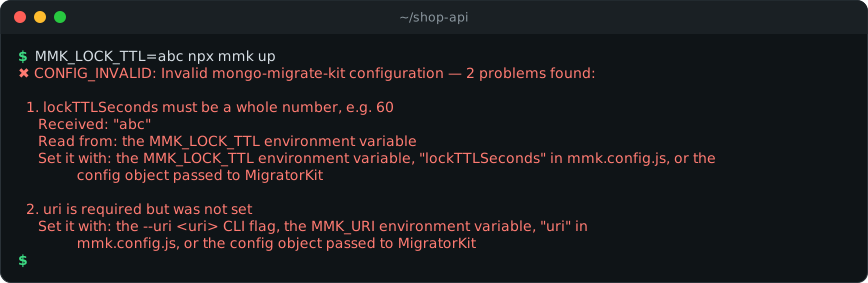
It also refuses to guess. These are all errors (or warnings) rather than being quietly ignored:
| Mistake | What you get |
|---|---|
uri: 'localhost:27017' | It must start with mongodb:// or mongodb+srv:// |
A dbName with / \ . " $ * < > : | ? or a space | Rejected before the driver sees it |
MMK_STRICT=maybe, MMK_LOCK_TTL=abc, MMK_CREATE_EXTENSION=py | Names the variable, the value and what's accepted |
migrationDir (missing an "s") in a config file | rename it to "migrationsDir" |
MMK_MIGRATION_DIR in the environment | A warning: did you mean MMK_MIGRATIONS_DIR? |
fileExtensions: ['ts'] | Extensions must start with a dot |
strict: 'true' (a string) | It has to be a real true or false |
hooks: { beforeALL } | Did you mean beforeAll? |
A logger missing some methods | Lists the missing ones |
migrationsDir points at nothing | A warning with the full path it looked at |
With --json, the same problems come back as data on stdout, under error.details.issues:
{
  "error": {
    "code": "CONFIG_INVALID",
    "message": "Invalid mongo-migrate-kit configuration — 1 problem found: …",
    "details": {
      "issues": [{ "key": "uri", "problem": "is required but was not set", "howToSet": "…" }]
    }
  }
}
In code, they're on error.context.issues:
import { runMigrations, ConfigInvalidError, type ConfigIssue } from 'mongo-migrate-kit';

try {
  await runMigrations({ uri: process.env.MONGO_URL, dbName: 'shop' });
} catch (error) {
  if (error instanceof ConfigInvalidError) {
    for (const issue of (error.context?.issues ?? []) as ConfigIssue[]) {
      console.error(issue.key, issue.problem, issue.source, issue.howToSet);
    }
  }
  throw error;
}
Connection defaults
mmk creates the MongoDB client with a few defaults so a wrong address fails in seconds instead of hanging:
serverSelectionTimeoutMSandconnectTimeoutMSare 10 seconds.retryWritesis on.- Your write concern is left alone. If your URI says
w=1for a fast bulk migration, that's what your migration gets.
The only writes mmk forces to w: 'majority' are its own: the history and the lock. That way the history and the lock survive a primary failover whatever your URI says.
Anything in mongoClientOptions is applied last and overrides these defaults:
export default {
  uri: process.env.MONGO_URL,
  dbName: 'shop',
  mongoClientOptions: {
    tls: true,
    serverSelectionTimeoutMS: 5000,
    readPreference: 'primary',
  },
};
Passwords in error messages
The MongoDB driver sometimes puts the connection string in its error messages. mmk removes user:password@ from those before they reach your logs, --json output or the error object.
Next
Deploying and CI shows how to run migrations in a pipeline, block a deploy while migrations are pending, and read the JSON output.